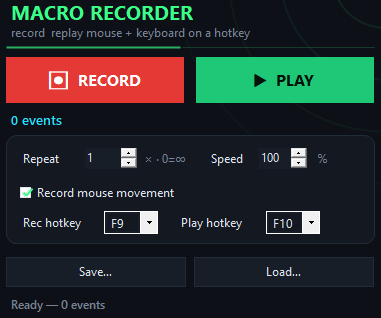
Record your inputs for a single Tower of Hell section—clicks, keystrokes, everything—and replay them to work on timing without repeating the whole climb. Run your recorded section as many times as you want, adjust the replay speed, or keep pressing F10 while you step away during lobby downtime.

Every click and keystroke lands in the same sequence and timing you captured. The replay happens at the hardware input level, so it works even when Roblox is in focus and the game window fills the screen.
A section macro cuts out the repetition once you've found a pattern that works.
You capture one successful run of a section. Every replay lands the same way—no drift, no hesitation, no new mistakes creeping in. You drill what actually works, not a guess at what might work.
Slow the replay down to 10% to analyze your movement frame by frame. Speed it up to 300% to burn through fifty attempts in five minutes. You pick the pace.
Loop your recorded section while you step away or work on something else. The macro keeps your inputs flowing so the game sees activity, and you do not have to sit there clicking.
Each recorded section is stored as a file on your machine. Load the same section tomorrow, next week, or on a different computer without recording it again.
Start the macro, capture your inputs, save the file, and replay whenever you want to practice.
Tower of Hell Macro replays normal keyboard and mouse input—the same signals you would send by playing manually. It does not inject code into the game, modify the client, or bypass any security. Whether macros are allowed depends on Roblox and Tower of Hell's rules; check their guidelines before using one.
You can record anything—a single section, multiple sections, or a full climb. For Tower of Hell practice, recording one section at a time keeps your file focused and lets you drill that specific pattern until you master it.
Keystrokes and clicks replay reliably across different resolutions. Pure cursor movement is coordinate-based, so if you capture on a 1440p monitor and replay on 1080p, your mouse may land in a different spot. For section practice, use keypresses and clicks rather than long cursor paths.
Yes. The speed slider ranges from 10% (slow-motion study) to 1000% (instant replay). Slow it down to watch your timing, speed it up to run fifty reps in seconds.
No. The macro runs completely offline. There is no update ping, no telemetry, no analytics, no phone-home. It works inside an airgapped network.
Yes. You can replay a routine once, a fixed number of times, or indefinitely until you press a key to stop. Set it looping and the macro will keep running your section until you tell it to quit.
Just stop the recording by pressing F9 again. If the capture did not go the way you wanted, record a new one. Each time you record, you replace the previous capture in memory, and you can save multiple recordings as separate files.
Download Tower of Hell Macro, capture one successful section run, and replay it at whatever speed helps you lock down the timing—slow for analysis, fast for repetition, or on loop while you step away.
Download for Windows